


 wunderbar pack ! Danke matthias.gose
Beiträge von ES64F4
-
-
Hum, not the best choice. With TTB, we already have 70 BR 185... I would be pleased to have Taurus and/or Vectron AI.
PS : Sure I will buy all AI stuff from 3Dzug !
-
It looks the new plaform characters are fine with no-DTG routes.
-
No more empty platforms in Konstanz Villingen !
Summer event in Lindau...
... and travelers in Trier station. -
I found the problem. Coupling folder was missing. Only Advanced installation have issue. With the academy asset pack, the coupling is taken from the academy asset pack. Without, well... It crash the game. I hope the was the only reason ! It should be...
-
Hello

My project is already done (BR 189 Academy Repaint Pack). I know how to make blueprint and I have run a long batch of tests before send it to the download section.
To test my pack, I have create some basics scenarios for Seebergbhan, Konstanz Villingen and 3CCR. With a none released version of the pack, from time to time, I encounter crash to desktop. When I try to edit the scenario, the game also mostly crash. I use RW_Tools to replace the *my* BR 189 with TTB Traxx. It works fine. So I delete my job an start again creating the blueprint and the repaints. Everything was fine. I was happy and do a new batch of tests. I create some scenario again and check it there was no issue while edition. It was fine. I release the pack.
Yesterday evening, I start to edit some of my older scenarios to enjoy the new engines from the pack and the bug comes back. The game crash. Before a crash, I noticed that the blueprint and/or repaints have a black texture, not the missing texture, not their texture, a nice shiny black. First time I see such a thing. If it happens, the scenario crash and trying to edit the scenario also crash the game. I managed to save a scenario just before it crash and it helps me for more testing. I place a copy of the scenario in a safe place to reuse it for more inquiries.
I replace the blueprint repaints with more classic repaints using GeoPcDx and a full engine bin file. I use the same naming so I can test again with the saved scenario. It load the saved game and... it works flowless ! The only downside was that all blueprint repaints have the paint of the engine use as blueprint.
So I wonder if I make mistake in my blueprint and repaints or if the blueprint repaint technology may have issue or it was just bad luck (I doubt because same kind of crash happens several times).
I noticed that most editors (vR, RSSLO, DTG, Chistrain) did not use blueprint. Sure they know how to do it, but why they dont use it ? It save plenty of memory and storage space.
Any advise is welcome. If someone can have a look at my files, i would be pleased.
-
My plesure. For know, I have no more idea of where to look for free memory. I have shared all my personnal solution, it can help other ones. And those who play scenario with light Rolling stock and/or scenario with few trains and/or on old, or better, on optimisez routes nice to know they did not have to tweak the game. Perhaps one day, they will need to do so.
I forget to tell. I start searching memory solution because I was not able to end this scenarios pack from 3Dzug (crash before end) : http://www.3dzug.de/Train-Simu…Vol--32--WINTERZEIT-.html
Some technical informations :
- railworks.exe load the game, it laods all files in Railworks\data\textures\frontend useful and useless ones, it makes no difference. They are part of the interface only.
- when railworks.exe load an engine, it loads all related texture and sound : blueprint vs 1 GeoPcDx for each repaint
- when railworks.exe starts, it also load all routes infos/pictures, rolling stock picture, all preloads and all scenario names (more you have, more memory it takes). That' a reason a scenario can be fine for some and not for others.
- i have split my TS installation in 3 : DB/OBB/SBB, UK and USA/CA. This is a bit longer to handle but it avoid loading or having Rolling stock which will never run togather (yes, I'am a bit crazy from time to time).
- large nm texture can be replaced by the nmc texture with an acceptable (or even nearly no) waste of quality. I dépends on what you do : play the game from cab, taking picts, driving time to time from external to see the landscape or look your stock with a zoom or a microscope !Well everyone play it his way. Like a have already tell : all what I found, I share it ! Everything can be useful to someone one day.
-
I would like to explain why I do this small patch. First of all, railworks.exe is a 32bits process and Windows 64bits will give 4096 MB of virtual space memory (see https://en.wikipedia.org/wiki/Virtual_address_space). You can have 64 MB, a 32bits app will have 4 GB. And the worst, railworks crash when railworks.exe reachs about 3300 MB (use any monitoring soft for some time will show it). It's an old school software and it will never be update in 64bits.
Routes and engines from some editor are taking more and more memory with most time too big textures. No need to talk again about Influenzo 65 MB textures, I just place 6 BR 189 AI within 66 MB with fine texture for AI. I play in 2560x1440 maxed so no need to tell me about making too low res textures or use old hardware.
DTG and/or RSC and/or Kuju did not optimise their work. A proof ? Yep, see what it in the logos.TgPcDx (2.7 MB) from Railworks\data\textures\frontend ! A hand gun... and lost in a layer a few Kb Kuju logo... They use about 6 times a 1920x1080 JGP with no compression or TGA with the same loading image : a pure waste. I reduced from 6 MB to 512 Kb (JPG 15% compression YCbCr 4x4 2x2 2x2; hard to see an a lost of quality). You can take a look at my JPG renamed in TGA an compare with original ones. If you see glitches, just tell me. Even, who care about having a slighly lower quality in the loading screen ? There are also files that the game use anymore (component for TS 2013 interface or older). DTG use 4 MB TGA image which can be replaced by 500 Kb JPG or PNG. And if the engin was PNG compatible, it would be possible to recover about 100 MB.
So if you want to be as far as possible from the 3.3 GB limit, every MB spared is fine : clearing junk and reducing some texture are fine solutions. Or you can go an cry on forum that your TS crash all the time with big scenario on some big/recent routes... Each one his way.
What I do for my personnal usage, I also shared it in forum. You like it, enjoy. You don't like it or need it, pass your way. Also try it before writing comments.
And just one last think or thing : 80 MB from 600 MB is about 13% and those 80 MB are still ~3% from 3300 MB.
PS : I work part time in network storage (SAN, File server and so on). When we setup a new infrastructure, customers tell us : Great, we have planty of room and fast storage for years. We always recommand to spare any amount of storage (mostly for Flash high en SAN and also SSD storage). Most time, we are call back in less than two years to free some space... Spare space advice ? Oups... We will take care and clean some space, just don't forget to pay our second bill ! That's perhaps why I hate waste of space and lake of optimisation... I got to change my mind and love it because it pays !
-

Tests are running fine. I managed to preserve the possibility of driving the AI locomotives and maintaining a very low memory occupancy.
-51 MB40 MB for the based engine with full audio and textures (BR 189 917 Lokomotion)
- All BR 189 can be driven (low resolution textures inside but readable)
- Included power correction
- Same lights level as vR engine
- First panto used (need to place "driver" mark)
- Self sufficient pack (works with or without Academy)
- All BR 189 Academy features preserved : AFB, PZB, cab light, etc.
- Preload and quick drive capablity for BR 189 917 Lokomotion
- Easy install : only one AP with fast compression !
- Easy way to add repaints : 1 folder with 1 texture and 1 engin .bin file
- 5.33 MB per repaint -
The outside is great with Matthias J.'s textures. And the inside is fine with only 2 MB (1.7 MB for cab + .3 MB for driver).
TTB Traxx Lokomotion KI will have BR 189 KI friend ! -
Working on a pack of BR 189 AI...
Six vR BR 189 : about 500 MB
Six opimized BR 189 AI (Academy based) : 65 MBThe blueprint is ~40 MB. Each engine is a single folder and takes 5.33 MB : 1 2K DXT5 texture and two 1 Kb .bin files. For testing I use Raildesign texture. I have removed every useless file for the blueprint : no Inside cab, no Inside noise, etc. All textures used to view the Inside cab from outside take about 1.75 MB. The good pantho is up when locos are running. The third when they don't move; I dunno how to fix this.
-
-
I have the Ciytjet since long ago but I did not use it a lot until I found this patch : https://railworks-austria.at/i…ipt-und-soundmodifikation
This is a great uptdate. It brings very nice sound and AFB to the train. Now, I really enjoy the Cityjet.
-
There is an easy option to change the number in RW Tools : change number.
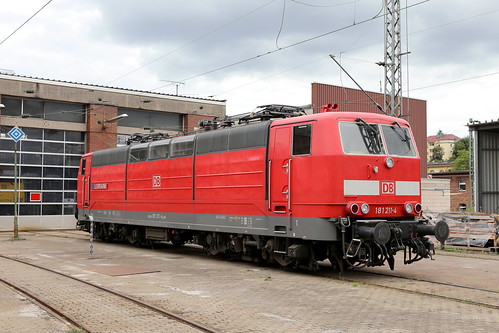
BR 181 are not supposed to have specific windows on top side at the mid-engine ?
-
-
 SemmeringBahn patched...
 -
I have recieved excellent news from Schienenbus : Radiomaster allow me to inclued a part of his 3D vegetation pack in my upcoming patch for all german DTG/RSC routes. It will switch DTG/RSC trees with radiomaster one's. I have improove them to avoid visible LOD changing. The platform will use the characters introduced by LGVMedSouth and increase the number of characters on platforms. There are 4 sets of 12 characters wearing seasonal clothes. The patch will also set nices skies.
EDIT : DTG/RSC German route patch for 3D trees, platforms and sky is available.

-
I have nearly finished my upgrade for Südbahn and TauernBahn. 3 comparative picts :
...and 4 screens from each route.
-
WIP on Tauernbahn with my KT patch experience...
-

