


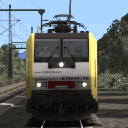
Ich habe die BR 103 vergessen ... Es ist immer eine Freude, diese BR103 mit einem TEE zu fahren. 
Beiträge von ES64F4
-
-
InterCity BR Class 370 ‘APT-P’
Gatwick Express BR Class 460 'Juniper'
Class 67 with AP Enhancement Pack -
Münster Bremen kommt mit MF BR 145 an. Die MF BR 145, eine sehr gute Lokomotive, muss nicht separat gekauft werden.
vR BR 185.2 ist meine Lieblingslokomotive. Mir gefällt auch die VR BR 152. -
Nuremberg - Regensburg...
 Eine Eisenbahn ohne großes Interesse. Nicht hässlich, aber auch nicht schön. Die hellen Farben der neuen Bäume stimmen nicht mit den alten verblassten Texturen überein. Das Material ist einfach gut für KI-Züge. Mit der vR-Spur und einigen Modifikationen kann es optisch ansprechend werden. Aber der Kurs wird langweilig bleiben. Es gibt nur wenige Variationen der Geschwindigkeit und nicht viele Steigungen.
 -
Reginal Express nach Konstanz.
-
vR BR 111 Vrot bei abgenommener ZZA-Anzeige (textur transparent).
-

RE4703 nach Konstanz
Aufgabe,die richtig richtig viel Gaudi macht. Auf in den Sonnenaufgang, wenn da nicht der böse böse Lokführer des Gegenzuges nicht wäre

(Bei dieser Fahrt hatte ich jetzt 2mal verschüttete Tunnel)
 This is due to the 8-Re zug wich is placed on a point and because of this, it did not start. Edit the scenario, move the train toward Villigen (20 m is enough) and it's fixed.
 -
Der Rest des ersten Fracht-Szenarios. Ich bin erobert... Welche Qualität Arbeit !
-
Hausach Villingen : es ist wundervoll !


-
Ffiktionale aber wundervolle Reise!
Mein BR 218 Blue Beige hat eine moderne Kabine und abgedunkelte Fenster. Die Farbe der Lokomotive entspricht der meines neu lackierten Zuges. Alles ist wunderbar! 
-
Übrigens, zu welcher Zeit?
-
Die letzten Nicht-DTG-Strecken wie die von Virtual Railroads, Virtual Track oder PAD-Labs sind wirklich schön. Bei der TSG ist es genauso. Eines bedaure ich jedoch: Es gibt keine Szene mit Charakteren. Ich frage mich, warum niemand andere Charaktere als Kuju erschafft. Es wäre immer noch ein echter Vorteil für das Eintauchen.
Ich freue mich auf morgen TSG Hausach - Konstanz!
-
Es gibt es nicht, aber ich will es so sehr. Also habe ich es geschafft.

PS: Ich habe gerade die wagen neu lackiert.
-
I have successfully created a Dostos set for the vR BR 218. The original driving trailer acts now as a simple wagon (it was my wish). The Dostos color match the BR 218 color (enough to my like even if it's not perfect). This set always display Reginal Express on all ZZA because the porpose is QD. I would be pleased to share it but unfortunately, I had to edit GeoPcDx to reach my goals.

At least, I can share the texture if someone want it. -
Fahren Sie mit der Inselbahn mit der BR 218.

-
Farbabstimmungstests... Color matching tests to have Dostos and BR 218 who fit together.
-
Ein Update ist erschienen.
Ich habe gestern Version 4 geladen. Gibt es heute schon eine neue Version?
-
The Re 460 have now worst sound. It's nearly noiseless on straight line and the sound is far louder on points and in curves.

The QD from Bellinzona to Erstfeld is not fixed (still 80 Km and wrong count after end of Gotthard tunnel). -

Also nach allem, was ich bisher über den zeitlichen Vorlauf einer Veröffentlichung über Steam gehört habe, kann die Entscheidung dazu eigentlich nicht wesentlich nach Veröffentlichung der TSG-Version erfolgt sein.Das mit den zwei Versionen finde ich wirklich schade, weil man jetzt wieder in Szenarien wild rumtauschen muss. Ob man wohl den TSG-Ordner kopieren und als TSG_Steam umbenennen kann, um ihn auch für Szenarien für die Steam-Version verfügbar zu haben? Ich hab so'n bisschen Bammel, weil ich gerade mit dem Raustauschen des 425 mal schlechte Erfahrung gemacht habe.
Fortunately, it is very easy to correct the problem of two providers for the same rolling stock.
Example (I dont have the 425 so path are just here to explain):
You have the TSG unit. Within the TGS \ 425 \ EMU \ folder, you have 425-1.bin (engine 1), 425-2.bin (center wagon 1), 425-2.bin (center wagon 2) and 425-4.bin ( engine 2).
You just have to create a named folder TGS-Steam \ 425 \ EMU and paste the 4 bins within.
Most time, this will work fine (99,9%). If you want to be sure it will always be safe, edit your routes and add TSG 425 and Steam-TSG 425 as provider.PS : I have replaced all the GermanRailRoadsRW BR 143 and BR 151 by TTB Traxx for more then two years with this kind of workaround. I have not issue. It takes far less time that to edit all scenario with RWTools.
-
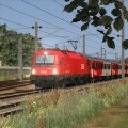
Hab da noch was kleines gefunden. Wenn es schüttet, sieht es irgendwie aus, als ob der Regen aus Fahrersicht VOR der Sonnenblende ist, bzw. die Sonnenblende hinter der Frontscheibe. Sieht beim wischen irgendwie komisch aus.
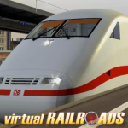
Da ist nicht allzuviel zu machen, da sind drei acht Bit Alphas hintereinander geschachtelt und das gibt Krieg ( Z Fighting ) wer nun zuerst zu sehen sein soll.
Es ist jedoch ein kleiner Fehler von Alpha und Z. Version 4.0 und das Problem ist immer noch da...