
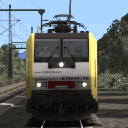
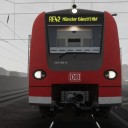
Mit dem Zugbus BR642 habe ich im Allgäu viele Ausflüge zu unternehmen! 
Beiträge von ES64F4
-
-
 Alles anzeigen
Eigentlich könnte man doch den Ordner vom Steam Produkt in den von vR einfügen?
z.B. Railworks/Assets/vR_Steam_ProLine/vR_BR112_1_VRot
in
Railworks/Assets/virtualRailroads,
Dann sollte eigentlich das Steam vR Fahrzeug den selben Ordner Pfad haben wie die Fahrzeuge beim Original.
Zu IKB V3:
Habe ich mir bei Steam geholt, und es gibt keine Probleme mit den Szenarien hier aus dem Forum. Ebenfalls funktioniert das Rinckentalbahn Update von STWS
Es ist möglich, aber etwas komplizierter. In der Regel reicht es aus, nur die Lokdatei in den anderen Ordner (dh BR120.bin) zu kopieren. Oft ist es auch notwendig, den Provider zusätzlich im Szenario zu aktivieren.
Für Franckfurt Cloblenz habe ich die .bin von Christrains Flirt in den DTG DLC-Ordner kopiert (ich habe GeoPcDx, TGPcD usw. gelöscht). Es wird vermieden, dass sich der Zug zweimal auf der Scheibe befindet.
In angines.bin gibt es vollständige Pfade zu anderen Bins, zu GeoPcDx (relative Pfade zu Texturen, aber da die engine.bin den richtigen Ordner mit dem anderen Anbieter angreift) usw. So funktioniert es. Manchmal muss man ein bisschen an RWtools basteln.
PS : Ich hoffe die Übersetzung sagt nichts ...
For example, if I don't have the BR101 ICE but have the BR101 VRot, I can copy the BR101-VRot_DynNum.bin from VirtualRailroads\vR_BR101_VRot_EL\Elloks\BR101 to VirtualRailroads\vR_BR101_ICE_EL\Elloks\BR101 and rename it : BR101-VRot_MET_ICE.bin (the expected name). It will work. When a scenario calls BR101-VRot_MET_ICE.bin, it gets it. All links within BR101-VRot_DynNum.bin points to the good place. Links to *childs* (audio, other bins, GeoPxDX are full links, not relatives one). Within the *child called objects*, path are relative but because the parent is call in the right place, it's OK.
I use this tweak because I dont want to store 2x times the nearly same engine. The *fake* BR101 ICE wont be able to run at 230 Km/h like the real BR101 ICE (speed is coded in the script). But the job is done. For my personnal use, I have the BR101 ICE script for the regular Vrot so she can aslo run at 230 Km/h (need to change some values for ABF needle).
-
Ja, kein Problem.
Ich werde eine QWERTZ-Version des Mappers machen.
-
Ich habe vergessen, um Feedback zu bitten. Wenn alles gut geht, arbeite ich weiter an den anderen Änderungen. Danach werde ich ein Update Pack machen (im Download).
-
Ich habe einen kompletten InputMappers für den Zugbus erstellt. Die meisten Bestellungen sind wie bei vR.
Extract the files and copy DB642.bin and OBB5022.bin to Assets\RSSLO\VT642\InputMappers.
Function (added or changed) Key AFB On/off Shift + A Engine On/Off Z / Shift + Z AFB On/off E Select left doors + open doors on left side R Close doors (from any open side) Shift + T Select right doors + open doors on right side Y Sun blinder open/close U / Shift + U Instrument light On/Off I / Shift + I Headlights H / Shift + H High beam Control + H Place/remove the key K Turn On/Off the key Shift + K Place the key, turn on key, AFB On, reverser forward (it was for my testings) Control + K Cab light and desklight L / Shift + L Horn 1 B Horn 2 N Handbrake On/Off Slash / Shift + Slash Train Brake + / - NumPad + + / NumPad + - PZB On/Off Shift + 8 Sifa On/Off Shift + 7 Sifa acknowledge Space PS : InputMappers acts on directly engine control without script verification. It's possible to start engine with only key in slot...
-
Ich arbeite an einem vollständigen InputMappers für den OBB5022 und den BR642. Ich bereite auch einen fiktiven BR642 mit AFB vor. Ich habe auch die Fenster abgedunkelt (wie immer) und eine verwitterte Windschutzscheibe gemacht. Mit den Geräuschen von Linus macht es Spaß, mit dem Zug zu fahren.
-
Sorry for English, translatations are always wrong!
Q : Why are RailTraction commands so slow ?
A : Just beacause their have a too low values in the .bin file !
Exemple for Reverser control :
Code
Alles anzeigen<cControlContainerBlueprint-cControlValue d:id="2667307"> <ControlName d:type="cDeltaString">Reverser</ControlName> <DefaultValue d:type="sFloat32" d:alt_encoding="0000000000000000" d:precision="string">0</DefaultValue> <MinimumValue d:type="sFloat32" d:alt_encoding="000000000000F0BF" d:precision="string">-1</MinimumValue> <MaximumValue d:type="sFloat32" d:alt_encoding="000000000000F03F" d:precision="string">1</MaximumValue> <BriefDescription d:type="cDeltaString">Reverser</BriefDescription> <DetailedDescription d:type="cDeltaString">Reverser</DetailedDescription> <ApplyToConsist d:type="cDeltaString">eFalse</ApplyToConsist> <HUDControlID d:type="sUInt32">0</HUDControlID> <InterfaceElements> <cControlContainerBlueprint-cInteriorIrregularNotchedLever d:id="2667317"> <ElementName d:type="cDeltaString">Reverser_Intermediate</ElementName> <DifficultyType d:type="cDeltaString">StopGo</DifficultyType> <PickTransformName d:type="cDeltaString">revers</PickTransformName> <MovementType d:type="cDeltaString">MoveUpDown</MovementType> <AnalogInputSensitivity d:type="sFloat32" d:alt_encoding="0000000000000840" d:precision="string">3</AnalogInputSensitivity> <DigitalInputSensitivity d:type="sFloat32" d:alt_encoding="0000000000001040" d:precision="string">4</DigitalInputSensitivity> <AnimationName d:type="cDeltaString">Railtraction\Lint41\BR648\Cabview\revers</AnimationName> <OutputInterface d:type="cDeltaString">eCab</OutputInterface> <RestInNotchedPosition d:type="cDeltaString">eTrue</RestInNotchedPosition> <DisplayNotchName d:type="cDeltaString">eTrue</DisplayNotchName> <Notch> <cControlContainerBlueprint-cInteriorIrregularNotchedLever-cNotchData d:id="2667329"> <Identifier d:type="cDeltaString">V</Identifier> <Value d:type="sFloat32" d:alt_encoding="000000000000F03F" d:precision="string">1</Value> </cControlContainerBlueprint-cInteriorIrregularNotchedLever-cNotchData> <cControlContainerBlueprint-cInteriorIrregularNotchedLever-cNotchData d:id="2667332"> <Identifier d:type="cDeltaString">O</Identifier> <Value d:type="sFloat32" d:alt_encoding="0000000000000000" d:precision="string">0</Value> </cControlContainerBlueprint-cInteriorIrregularNotchedLever-cNotchData> <cControlContainerBlueprint-cInteriorIrregularNotchedLever-cNotchData d:id="2667335"> <Identifier d:type="cDeltaString">R</Identifier> <Value d:type="sFloat32" d:alt_encoding="000000000000F0BF" d:precision="string">-1</Value> </cControlContainerBlueprint-cInteriorIrregularNotchedLever-cNotchData> </Notch> </cControlContainerBlueprint-cInteriorIrregularNotchedLever> <cControlContainerBlueprint-cInteriorVisibilityObject d:id="2667338"> <ElementName d:type="cDeltaString">Untitled</ElementName> <DifficultyType d:type="cDeltaString">StopGo</DifficultyType> <LowerVisibilityThreshold d:type="sFloat32" d:alt_encoding="000000C0CCCCECBF" d:precision="string">-0.9</LowerVisibilityThreshold> <UpperVisibilityThreshold d:type="sFloat32" d:alt_encoding="000000C0CCCCEC3F" d:precision="string">0.9</UpperVisibilityThreshold> <TransformName d:type="cDeltaString">drivedirectionlit</TransformName> <ThresholdType d:type="cDeltaString">Value</ThresholdType> <OutputInterface d:type="cDeltaString">eCab</OutputInterface> </cControlContainerBlueprint-cInteriorVisibilityObject> </InterfaceElements> </cControlContainerBlueprint-cControlValue>2 lines are the cause of the very slow move of the reverser:
<AnalogInputSensitivity d:type="sFloat32" d:alt_encoding="0000000000000840" d:precision="string">1</AnalogInputSensitivity>
<DigitalInputSensitivity d:type="sFloat32" d:alt_encoding="0000000000001040" d:precision="string">1</DigitalInputSensitivity>
AnalogInputSensitivity : is the speed for an action made with the mouse
DigitalInputSensitivity : is the speed for an the same action with inputmapper (key combination)
A value of 1 set the speed to ... 1 (according to script or .ban file) it can be different from animation to a other (even for the same engine)
A value of 10 make the same animation 10 times faster.
A value of 0.1 make the sama animation 10 times slower.
A fix the reverser slow move by changing the 2 lines :
<AnalogInputSensitivity d:type="sFloat32" d:alt_encoding="0000000000000840" d:precision="string">3</AnalogInputSensitivity>
<DigitalInputSensitivity d:type="sFloat32" d:alt_encoding="0000000000001040" d:precision="string">4</DigitalInputSensitivity>
By doing this change, reverser have a decent speed with the keyboard (Key S and W) but also with the mouse.
This is an exemple, but it will work for any animation. You can change the speed of any animation by changing the originals values. Higher value, higher speed. Lower value, lower speed.
Here is a list of too slow controls for Lind71 and 27 :
Reverser
Headlights
Fern licht
Cabin Light
Sander
wipswitch
pzb befehl
PZBfrei
PZBWACH
For most of them, you need to change from 1 to 5 to have a normal speed fot the control.
-
Hallo,
Ich habe einige Probleme mit Lint 41 behoben: langsame Befehle, fehlende Funktionen in Inputmapper und Inputmapper mit nicht standardmäßigen Tasten.
Behebt den Fehler des Umkehrers, der mit S und W nicht in die neutrale Position geht.
Der Inputmapper entspricht dem VirtualRailroads-Standard :
Instrument light Key_I Horn Key_B Sander Key_X Sifa Key_space Sifa On / Off Shift Key_7 PZB On / Off Shift Key_8 PZB Modus change Control Key_8 Headlight Key_H / Shift Key_H High Beam Control Key_H Tempomat On / Off Shift Key_A Desk and cab light Key_L / Shift Key_L Handbrake Key_Slash / Shift Key_Slash Wiper speed Key_V / Shift Key_V Wiper interm Control Key_V Door Open / Close Key_T / Shift Key_T Contact key Key_K Train brake Numpad Plus / Numpad Minus Entpacken Sie in einem temporären Ordner. Fügen Sie den Railtraction-Ordner in Assets ein. Fix nur für Lint 41 DB.
Ich habe das gleiche Update für die Lint27 DB. Ich werde posten, wenn das Feedback positiv ist.
-
 Kleiner Dieselzug für eine Fahrt.
 -
Beste Wünsche und ein gutes neues Jahr 2021!


-
Der BR 152 arbeitet Tag und Nacht, Sommer und Winter in ganz Deutschland!
-
Ich hatte viel Spaß beim Neulackieren des BR143. Ich habe endlich 4 Kopien mit einer anderen echten Registrierungsnummer (und echten) gemacht.

-
Die letzte Reise...
-
Alt BR143: Glasscherben, Graffiti, ZZA usw.
-
-

BR152 unterwegs!

-
Waggonz Sggrss mit angepasstem Sound aus 3Dzuk AI Pack + Softshadow Fix + mehr deutscher Endmarke. Schönes Stück Freeware.

Es scheint mir, dass es Repaints gab, aber ich kann sie nicht mehr finden.

-
Ich habe ein minimalistisches HUD mit einem sehr sichtbaren Zeugen für SiFa erstellt. Wenn SiFa nicht aktiv ist, gibt es kein Symbol. Wenn SiFa aktiv ist, erscheint ein schwarzes Dreieck auf gelbem Grund. Das Ziel ist nicht die Lesbarkeit, sondern maximale Diskretion für mehr Eintauchen. Es ist weiterhin möglich, in die Bereiche zu klicken, in denen ich die Piktogramme entfernt habe.
Entpacken Sie an einem temporären Speicherort und kopieren Sie die 5 Dateien nach Railworks\Data\textures\frontend
Die Bilder sind in TGA RLE (verlustfreie Datenkomprimierung). 4.3MB => 1.2MB
Nur für HUD F3 optimiert.
-
Kesselwagen für Uelzen!
-
Ein Containerzug mit einem BR152 auf HaSi.