



Beim Aufrufen bekomme ich "Beim Herstellen der Verbindung zum Datenbankserver ist ein Fehler aufgetreten"
Ich denke, die Website hat Probleme...
Beim Aufrufen bekomme ich "Beim Herstellen der Verbindung zum Datenbankserver ist ein Fehler aufgetreten"
Ich denke, die Website hat Probleme...
Tatsächlich habe ich die letzten Tage/Wochen viel getestet was den RWA Manager und die Nordbahn anbelangt.
Gefühlt habe ich alles 20x heruntergeladen, Probleme hatte ich keine.
Wird noch die RWA Manager Installation verwendet oder der mobile Client?
Grundsätzlich habe ich vorhin die Gesäusebahn vorhin auch geladen und das ohne Probleme, alle Assets vorhanden.
Verwendest du die Installation mit oder ohne AP Wetter?
Nur mal ne kurze Rückfrage Spikee1975 weil es mich interessiert.
In welcher Konfigurationsdatei wird denn das Pwd in Klartext gespeichert? Wärst du auch bitte so frei mit mir die Info zu teilen, welche dll deine Festplatte scannt?

Den Stw Fahrbar machen kann im Grunde jeder
Dann wäre der Stw im Sim früher fahrbar als in Echt.
Gefühlsmäßig würde ich sagen, 99,9% der Train Simulator fahrenden User verwenden Windows.
Die zusätzlichen, nicht Steam-Store Addons, kommen alle als .exe daher und dahinter sitzt sehr oft auch DRM-Software.
Mit GLÜCK könnte man dies mittels Wine zum Laufen bekommen, ich würde aber nicht darauf wetten.
Mein Gefühl sagt mir, dir fehlen mit deiner Linux Mint Installation noch Dependencies für Proton und Wine.
An deiner Stelle und wenn du es erneut ausprobieren möchtest, würde ich empfehlen, auf Steam OS zu warten ; dauert aber noch ein bisschen.
Da ist die Chance am Höchsten dass der TS funktioniert.

Um meinen PC vor unbefugten Zugriff und Datendiebstahl zu schützen. VPN ist ein Verschlüsselung System womit man im Internet Quasi Anonym sich bewegen kann und dabei werden deine Daten Verschlüsselt. Eine so genannte Ende zu Ende- Verschlüsselung, bekannt auch aus WhatsApp und anderen Sozialmedia Plattformen beim Nachrichten versenden.
Marketing ... Dir ist schon bewusst dass der VPN Provider deine Daten lesen kann? Diesbezüglich gab es auch schon Datenschutzskandale wo der VPN Provider die Daten verkauft hat.
Aber gut, jeder wie er glaubt.
Bei so einem Vorfall würde ich gar den ganzen PC platt machen, wer weiß wie die Logindaten geleakt wurden.
Wenn es erraten wurde wäre es ein Zufall weil man den Steamaccountnamen auch erraten müsste + MFA aktivieren.
Weiters, einen Passwortmanager (Keepass z.B.) verwenden und Passwörter generieren lassen.
Du musst dir nur ein Passwort merken und hast die best mögliche Sicherheit bei allen Accounts.
Nach Möglichkeit nicht überall dasselbe Passwort verwenden und Variantion rein bekommen.
Wenn du Windows nicht neuinstallierst kannst du die Lok auch ohne Lizenzschlüssel neu installieren.
Es gibt eine gesonderte Option während der Installation.
Ich denke RWA wird den 4020 bei sich im Shop veröffentlichen.
Das Prozedere bei den anderen RWA Produkten war gleich, zuerst aus den anderen Shops entfernen und dann im RWA Shop veröffentlichen.
ShortSeb Wennst nach Wolkersdorf willst, bist in Strebersdorf aber falsch 
Dein schreib halt hier was falsch ist ...
Intel ist momentan weder mit der 13. noch mit der 14. Generation zu empfehlen.
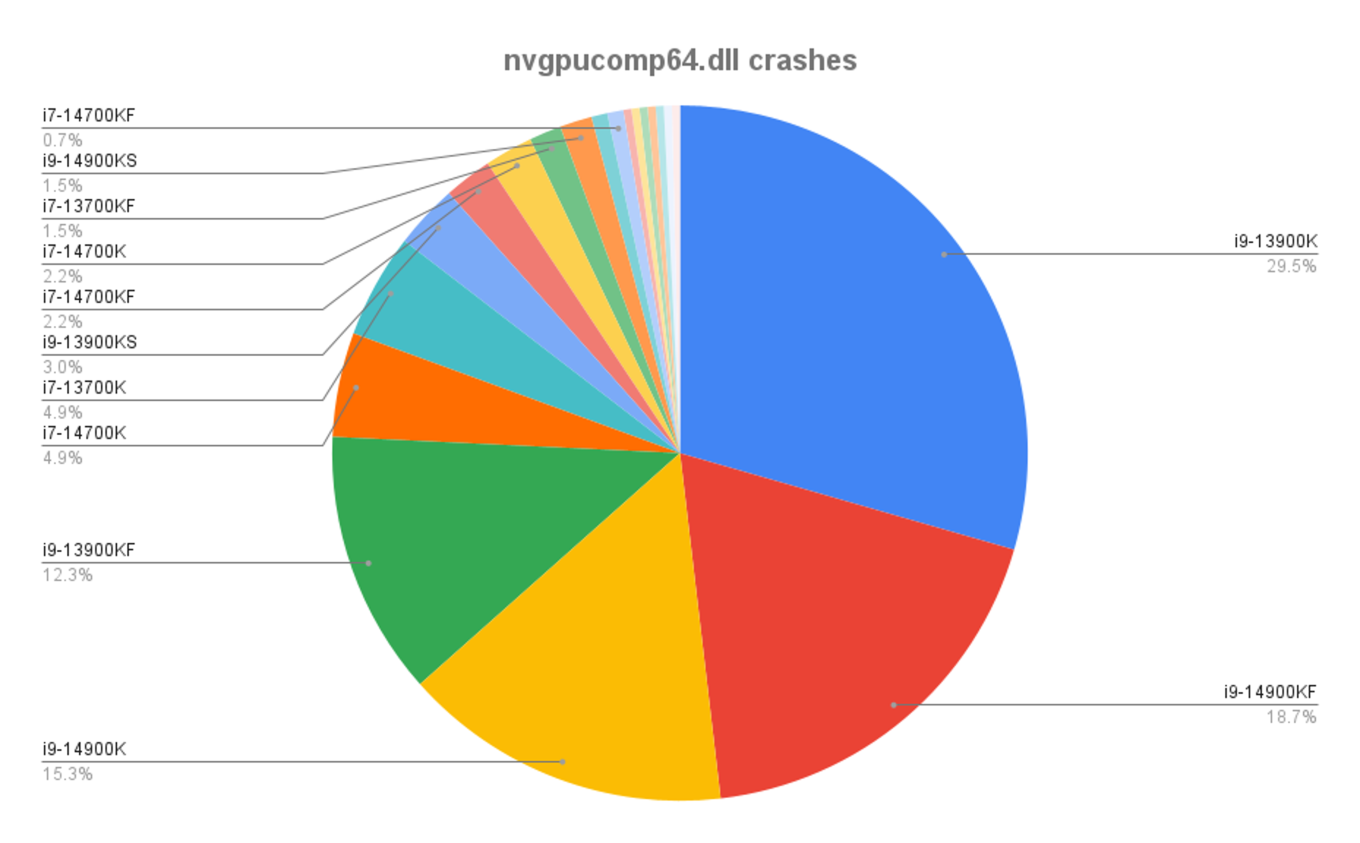
Unklar ist, ob die kommende 15. Generation ebenfalls von diesem Bug betroffen sein wird.
Ctrl + Shift + F1 drücken
In Österreich wird ohne Neigetechnik gefahren, wird in Passau immer ein bzw. ausgeschaltet.
Von Passau bis zumindest Würzburg (bin im April die Route gefahren) war es dann eingeschaltet.
Okay, was sind jetzt deine Erwartungen an das Forum?
Schick eine Email an chaloupka@imec-media.com
Alternativ: https://k-trains.com/en/contact-us/
Octopus Mein 7800X3D läuft statt mit 91° mit 70° und die GPU (3090) ist 100% ausgelastet.
Ich sehe keine Probleme in die Richtung.

Also ich melde mich zurück von meiner Windows 11 Neuinstallation.
Das wirds wahrscheinlich sein .... Windows neuinstalliert

( CCleaner oder ähnliches ) .
Das macht mehr kaputt als hilft...
Steht irgendwas in der Ereignisanzeige?

Vielleicht kann man das DTG mitteilen und es kommt ein Update dazu.
Wurde schon während der Beta Phase gemeldet ...

Wie kann auf die Beta wechseln? (bin bzw. auf Steam )
Diese Woche wird der neue TS mit den X3D Fix veröffentlicht, warte darauf.