Redefining speed limits from signals using standalone Zs3.

Discord Einladung
Trete unserem Discord-Server bei (klicke hier zum Beitreten).
  • Since I’m actively developing IKB4, I’ve run into a situation during the development process where the links from the signals need to be placed much farther away than the point where it makes sense to stop the speed limit from Zs3.
    After studying the issue in detail, the only way to do this at the moment (as I learned) is to move the links to the end of the first switch ends, where the speed needs to be redefined. And immediately after these switch ends, install virtual signals. But in this case, traffic will spill into the rail bottleneck and block other paths.


    To be more specific, I have an exit Ks with a limit of 40 across both outputs.


    The station is designed in such a way that the links need to be placed very far from the signal itself, in places where the 40‑km/h limit is no longer needed. As a result, trains have to crawl along at a speed of 40 for a very long time.


    Ideally, I would have to set Zs3 roughly like this, and that’s it - the train leaves the switch zone and can go 120. But in reality, this signal cannot override the speed limit set by the signal, meaning the engine still maintains the 40‑km/h limit until the train passes the link from the signal.


    All I want is to understand how to make Zs3 actually affect the speed limit from the signal. As far as I understand, the scheme with virtual signals is very complicated and can break the entire signaling system in terms of how it works with traffic.
  • Hi,


    your problem is a typical one when planning a station. Over the time there have been a lot of different solutions. Here are some:

    • invention of Signal Zs 10
      • look it up here: Eisenbahn-Signalordnung (ESO 1959) (Arbeitsversion) (Stand: 10.02.2026)
      • it signals the train driver that the speed restriction has ended
      • it may only be placed behind a signal in stations or interlockings where the train driver gets a speed restriction combined with the usage of a signal
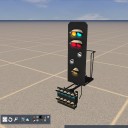
      • in your case it would be placed in the main track behind the last switch (second picture)
    • use signal Lf 7
      • it may only be used when the speed limit of the main track in the station is lower then the new speed limit behind the station
      • wont solve your problem because it would be placed behind the last switch of the station
    • build your track by using LZB or ETCS
      • only those systems are able to bring higher speed limits within a station from a certain point on to the driver

    So in your case using the Zs 3 from the signals may be the best option. Also the links you placed are correctly. Any AI driver will ignore the allowed speed limit from the link of the signal and will always use the speed of the track itself. For any player the visible signals on the track are mandatory and not the speed limits in the HUD. So best option here is placing a Zs 10. You may find an example for the use in the track Konstanz-Villingen. Dont know where exactly so please go on and search.

  • So in your case using the Zs 3 from the signals may be the best option. Also the links you placed are correctly. Any AI driver will ignore the allowed speed limit from the link of the signal and will always use the speed of the track itself. For any player the visible signals on the track are mandatory and not the speed limits in the HUD. So best option here is placing a Zs 10. You may find an example for the use in the track Konstanz-Villingen. Dont know where exactly so please go on and search.

    I understand all that perfectly well. In reality, there are many ways to indicate that a limit has been lifted. I wanted to reset the specific limit that the engine displays on the HUD - not the one on the track profile bar, but the one shown below the current speed (on the image).

    It’s just that if you ignore this internal limit, the game will count it as speeding. I wanted to find out if it’s possible to get around that specific one. Obviously, you can always just ignore these warnings if you’re not playing in Career mode.

    Here’s an example. We get a limit of 40 from Zs3. At the same time, the HUD even displays a future limit of 120 (due to the physically placed Zs3 in the path).


    However, when passing through Zs3, the speed limit in the simulation does not change, since Zs3 Form does not overwrite the limit imposed by the signal before the link.


    This is exactly the situation I want to fix, if such a fix exists at all. I studied the Nachteburg - Rannstadt route too (Konstanz-Vill with HV is a bit old and not KS); there, Zs10 is used where the signal‑based links have already ended. For this purpose, even shunting signals are used there, which is not entirely correct, as the AI may move onto the main line for this shunting signal ahead of time, and this will have to be restricted using invisible blockers or triggers.