I have this DB style station clock on my phone (running android 7) and would like a similar one for my laptop (Windows 8.1) and my tablet (Android 4.4.2)
The above clock is an android live wallpaper, which does not work on android versions lower than 6
All other station style clocks i've found do not look like the above clock... usually they don't have the hole in the second hand, they don't pause for 2 seconds at the top of every rotation etc.
I've seen people from here have DB style clocks on their screens when they post screen shots, so i wonder where they get them from??
I havent been doing that much in the way of mods to my trains... except i brightened up the MFA lights, digits and instrument backlight on the BR112.1.. i know it's supposed to be an old loco with age showing, but i mainly wanted the SIFA warning light to be brighter... and i made them all look like new instead Please note that i can not run TSX i think it's called.. the Dynamic lighting thing on my laptop... unless i like playing at 1/2 a frame per second... so the loco may already look like this in that mode.
But i've been playing with the excellent TS_MFD, and bought a couple of cheap broken tablets for £7.50 each, one of them is totally dead... mother board is gone... but i got the other (much better)... lenovo one working and fitted a new digitizer and usb socket (total cost £14)
I just got the tablet holders today, so added them to my little over bed train sim table:
The plan is to retrieve my desktop PC's from storage and have TS running on the 42 inch TV at the end of the bed, with the view moved to be just behind the cab window,
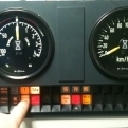
then have TS_MFD sending the MFA, EBuLa and brake pressure gauge to the tablets on the overbed table... i put the brake pressure gauges on my phone... not seen in the photo as i used the phone to take the photo but the phone goes in the holder just below the working tablet.
I will also be making up some new levers for the controls.. to replace the siatek throttle quadrant i use atm, and make it into a little driving desk with switches and levers on it that fits on the table in place of the laptop.
Here is where i realise the beauty of the TS_MFD and the TS_Fireman and TS_Conductor being connected via wifi, instead of a thick umbilicle cord from the main computer, along the bed to the table, i just need power to keep the tablets charged... that's assuming i can use an arduino with a wifi shield on it to send the lever and switch data back to TS_Fireman. would be nice if there was an all in one version here... TS - Conductor, Fireman and MFD just needing a single 'TS_Bridge' program running on the host PC,
I'm really sorry to do this... but i am trying to translate the 'lok konfigurator' into english so i can work out what things i am looking for when assigning the control data to it, can someone have a look at this very long list, and correct where i've got it wrong, and give me ideas to the ones i have no idea about please??.
i know that as i'm using only vR trains, a load of things in the konfigurator wont apply to my trains... i am seriousely thinking of getting the chris trains railjet as it looks to be the most advanced train yet for train simulator,
P.S, i will be making a donation as soon as i get paid next week as this program is transforming how i play train simulator, and i'm sorry for all the questions.
HAUPTSCHALTER = Main Switch / HS Aus Lamp SPANNUNG = Catenery Line Voltage i.e. 15Kv STROMABNEHMER STATUS = Pantograph up or down OBERSTROM = Traction Current BATTERIESPANNUNG = Battry Voltage EBULA DAY/NIGHT = EBula Button for day/night mode FUEHRERSTAND = *no idea* ??? INSTRUMENTBELEUCHTUNG = Instrument Lights VIRTUAL BRAKE CONTROL = Train Brake Lever VIRTUAL THROTTLE CONTROL = Throttle Lever TEILNEHMER = *no idea* ?? SYSTEM LAND = For Corss Border Trains, DE / Swiss power systems??
ANZEIGEN RICHTUNGSSCHALTER = Direction Switch / Reverser ZUGKRAFTVORWAHL = Power Notch (i.e. BR110/111 steuerwagens, 0 - 28) BESCHLEUNIGUNGSMESSER = Accelerometer, for Dial next to Speedo, power and braking force. SPEEDOMETER = Train Speed / Speedometer SPEEDOMETER VSOLL = Line Speed Bug ? (For AFB / LZB??) DISPLAY VSOLL STELLER = *not sure* AFB ?? AFB ON/OFF = Afb on/off TUER LM/TUER LM LINKS = T Lamp for Doors closed and locked TUER LM RECHTS = As above for trains with left and right door lights
SIFA/PZB/LZB ZUGART = Train Catogory.. O / M / U ?? SIFA AKTIV = Sifa on/off SIFA WEG = Sifa Lamp SIFA ZWANGSBREMSUNG = Sifa Emergency Braking Lamp?? PZB STATUS = PZB Status?? PZB AKTIV/LM BETREIB = PZB On/Off?? PZB LM 85 BLACK = PZB 85 Lamp PZB LM 85 INVERT = PZB 85 Lamp off?? PZB LM 70/1000HZ BLACK = PZB 70 Lamp *1000Hz Black*??? PZB LM 70 INVERT = PZB 70 Lamp off?? PZB LM 55 = PZB 55 Lamp PZB LM 55 INVERT = PZB 55 Lamp off? PZB LM 1000HZ =PZB 1000Hz Lamp PZB LM 1000HZ INVERT =PZB 1000Hz Lamp Off?? PZB500HZ INVERT = PZB 500Hz Lamp off?? PZB/LM 500HZ = PZB 500 Lamp PZB LM BEFEHL40 = PZB 40 - Befehl Lamp PZB RESTRIKTION = PZB 70 - 85 Lamps Flashing?? PZB WACHSAMKEITASTE = PZB Wachsam Switch?? PZB ZWANGBREMSUNG = PZB Forced Braking?? LZB SIWTCH ON/OFF = LZB on/Off Switch LZB AKTIV/PANEL ON/OFF = LZB Status?? LZB DISTANCE/ 1000ER = LZB Numbers Thousands? LZB DISTANCE 100ER = LZB Numbers Hundreds? LZB LED BALKEN = LZB LED strip for below 5km LZB ML B = LZB B Lamp LZB ML ENDE = LZB End Lamp LZB ML S =LZB S Lamp (not sure what for) LZB ML S_invert = LZB S LAmp Off?? LZB ML G = LZB G Lamp LZB ML G_inv = LZB G Lamp Off?? LZB ML H = H Lamp (not sure what for) LZB ML H Invert = LZB H Lamp Off? LZB ML UE = LZB U (with Umlauts) Lamp LZB ZIEL SPEED = LZB Target Speed?? ORDER LZB ZIEL SPEED (100er) = LZB speed digits 100's LZB ZIEL SPEED (10er) = LZB Speed Digits 10's LZB ZIEL SPEED (1er) = LZB Speed Digits 1's
BREMSEN LOK-BREMSZYLINDERDRUCK = Train Brake Cyclinder Pressure ZUG-BREMSZYLINDERDRUCK = Loco Brake Cyclinder Pressure HAUPTLUFTLEITUNGSDRUCK = Main Train Pipe Pressure HAUPTLUFTBEHAELTERLEITUNGSDRUCK = Main (Air Tank) Pressure FEDERSPEICHERBREMSE = Spring Brakes?? Parking Brake?? HOHE ABBREMSUNG = Hohe Abbremsung Lamp BREMSART = *no idea*??
BREMSTABELLE Table to adjust brake lever pressures??
Thankyou, so it looks like some vR loco's wont be able to display fully working MFA's then
i am using https://www.makeuseof.com/tag/…droid-apps-root-required/ to make my tablet hide the bottom navigation bar, it can also hide the top status bar (showing battery charge, wifi, time etc) but it shows a grey bar instead at the top... but using 'immersive mode' allows the EBula especially to look like it is a real unit rather than an app running on a teblet
The vR BR110 and it's 'Bnrbdzf' wittenberger steuerwagen have the data available too, things like 'PZB_LM_85' 'Sifa_LM' etc... i just need to work a bit more translating the list of "Bezeichung's" to "Controller Names" so i assign the correct items.
However: My current favourite loco, the vR BR112.1 uses the 'nodes' it seems, as does the BR120 there has to be a way to get at that data...
years ago i played a little with something called 'outgauge' which read the code of any game and found the bits that made gauge needles move and lights to come on... that was for then connecting real car instrument clusters to the game using an arduino... i did similar with my Omsi bus cab, but thankfully Omsi was written to allow easy access to all the games data with a simple .dll So maybe outgauge might be able to sniff out the 'nodes' data stream.
I'm playing with the BR112.1's engine .bin files, trying to add bits of code from the BR110, changing the calls to ones i can read in the simulation .OUT file, in the hope i can find the triggers, i can get the 'new' control names to show in the Lok Konfigurator... but they dont do anything, So i don't think it will be that simple,
I think there will need to be a bit of code that listens to the 'nodes' written, but i'm way out of my depth here,
The most i managed to do was add an entry to the engine .bin files for the 'open doors' command, and then have a switch click sound assigned to it, so pressing the 'T' button is no longer silent, it clicks on and off then the doors open,
One last thought... I use the 'TS 2017 raildriver and joystick interface' to control the trains from my driving desk and siatek throttle quadrant... that program reads the 'engine script . lua / out' files by modifying them a little, reading and then injecting code into them, i wonder if that's a way to get the data we want,
It would be really nice if virtual railroads would write a little program to get the data out of their loco's for us... i'd happily pay for the upgrade to each of their loco's i own (i also wish they would update their older loco's, again i'd pay happily for the updates.
the vr BR110 / 480 wittenberger steuerwagen has the MFA lamps ouput in the controller list... PZB_LM_85 and so on,
But the vR BR120 and BR112.1 do not... i read on page 20.. that Maik Goltz said "Nein ist sie nicht. Sie basiert auf LM Steuerung mit Nodes und nicht als Controller."
So... is there a way to read these 'nodes' ??
I prefer to drive only vR loco's due to their amazing physics and operation, they are ideal to be driven with a home train driving desk where the MFA is on a seperate monitor.
p.s, on the BR112.1 and i think ohter loco's the 'TAV status' lamp for the door locked T light.. it has a 3 position output on the controls list... 2 = on, 1 = flashing, and 0 = off. how would i set that up in the 'Tuer LM' entry on the lok Konfigurator?
Oh wow... this is something i have been hoping for since 2014... when i was playing with making zusi display work with train simulator (with help from nice people on this forum)
This is great, well done for making this work
I have managed to figure out how to get it working, despite my very rusty German, but i'm wondering..
is there a way to send the data from the main PC running trainsimulator to the remote device (an android phone... Samsung Galaxy S6, and soon an android tablet) via the USB cable rather than wifi?
I have the phone plugged into the laptop to charge it, and my home wifi isn't very good at times, so if it could send the data via the usb cable that would be a lot easier for me... i know i could connect extra monitors to the computer... but i am using my laptop to run train simulator atm, as i am stuck in bed. so i need every spare bit of processing power on the laptop to run train simulator.
Also, is it possibe to 'dock' the full screen views of the EBula and other displays? as i notice if i touch anywhere around the buttons area of the displays, the whole screen moves... and i have to re-centre it and try and press the button i was trying to press again.
Finally, is there a little guide to reading the EBula displays for an englishman?
I have figured out that "Esig" and "Asig" are for the entry and exit signals at a station, what does "Zsig" mean?
I notice "SBK XX" where the XX are numbers that change along the route, i think they are just before a station stop, what do they mean?
Anything else i should know... do any of the other buttons do anything once a plan is loaded? does the page return to the correct one after i scroll through them and lose the little marker that moves with the train along the plan automatically, or do i need to press a button to get position updating back on again?
And again, thankyou very much to the people who made this possible,
i want to learn how to make MFA displays and make one with the textures of a BR110 wittenberger steuerwagen's MFA if that's possible, so it looks like the real MFA rather than a computer screen version.
Oh,, one last thing, anyone figured out how to get the data out of the vR BR120? as it doesnt seem to output the PZB lights etc like the other classes of trains do from them.
Please move this to a different forum is this is the wrong one.
A little info about me... i am on the Autistic spectrum, and possibly have Bi-Polar or something similar, this makes me become very obscessed with things... Train Simulator and Omsi have been some of my long running obscessions. Back in 2012 i drove 1800 miles from England to Germany to buy the driving desk out of a Wittenberger Stuerwagen:
As well as parts from a MAN NG272 bus cab,
I also added a detour to Berlin to ride on the route 137, which was the route 92 as featured in Omsi pre 1990.. This was the time that lived in Germany, from age 5 to 12 (1983 t0 1990) as my dad was in the RAF... hence my fascination for German things i think.
I proceded to annoy my then partner by basically building a replica bus cab in my living room, we split up before i got to building the stuerwagen cab next to it, and shortly after things went very bad in my life, so i had to stop all simulator building work.
Hopefully things are almost sorted after over 3 years of hell, and so i am slowly getting back into the simulators.
My favourite loco's to drive are the ones made by VirtualRailroads, their expert line units really are amazing and nice to drive, but me being me, i saw some little improvements i could make to them, so here is what i have done so far:
I believe that the makers of vR loco's prefer people not to publish mods made to their stuff, i'm not sure anything i modify will be wanted by other people anway, So i'm really just modifying my vR loco's, cariages and steuerwagens for my self and showing here what i've done.. maybe to give others inspiration to modify things.
I must admit that i am very very new to this, i started off by modifying the inputmapper files 3 weeks ago, so all my vR units have the same key map between them.
I then moved on to adding sounds to things that have none, like the 'Bremse Loesen' Switch, this switch is working in most vR trains.... it releases the brakes... but it is silent, not even a click...
so i added a click and a hiss when it's operated so simulate the sound of the brakes being released:
Inhalte von externen Seiten werden ohne Ihre Zustimmung nicht automatisch geladen und angezeigt.
Durch die Aktivierung der externen Inhalte erklären Sie sich damit einverstanden, dass personenbezogene Daten an Drittplattformen übermittelt werden. Mehr Informationen dazu haben wir in unserer Datenschutzerklärung zur Verfügung gestellt.
When i figure the sound programming structure out better, i will make it so the release hiss only happens when the brake pipe pressure is below 5 bar.. this is not needed on all loco's i've discovered, some do have the hiss tied to the pressure gauge, but still no switch click.
Next i made up key assignments for the EBuLa's buttons so i don't have to use the mouse to operate it (Shift + Control Delete turns in on and off, Shift + delete for night / day, Shift + home, end, pageup, page down. operate the other buttons) And then i added peeps when the buttons are pressed, i know most of them are silent in real life... but i wanted peeps.. so i made mine have peeps
Inhalte von externen Seiten werden ohne Ihre Zustimmung nicht automatisch geladen und angezeigt.
Durch die Aktivierung der externen Inhalte erklären Sie sich damit einverstanden, dass personenbezogene Daten an Drittplattformen übermittelt werden. Mehr Informationen dazu haben wir in unserer Datenschutzerklärung zur Verfügung gestellt.
Then i jumped to playing with textures, and i changed the MFA 'Notch indicator' digits, as used by the BR110, BR111 and similar steuerwagens which have the lever controlled automatic tap changer, for some reason the digits are orange, and look like nixie tube digits... my real MFA has yellow LED digits, so i changed those textures... i still havent got them lined up exactly right, but i think it looks a lot more realistic with the yellow LED style digits:
Inhalte von externen Seiten werden ohne Ihre Zustimmung nicht automatisch geladen und angezeigt.
Durch die Aktivierung der externen Inhalte erklären Sie sich damit einverstanden, dass personenbezogene Daten an Drittplattformen übermittelt werden. Mehr Informationen dazu haben wir in unserer Datenschutzerklärung zur Verfügung gestellt.
Please forgive the video's quality, i'm using my laptop to run both TrainSimulator and record it... and the screen recorder drop frames to keep up, so the sound goes out of synch a little too... i will try and find the best settings to correct this... but until a week or so ago, i'd never recorded my screen before.
Ahh. that's what BR means in front of every German loco "Class" makes sense now, in england the loco's used to all have BR in front of the numbers meaning British Railways
i'm enjoying learning the German abbreviations for locomotive related things...
Still can't figure out what the V is for in 'Vist', 'Vsoll' and so on... Speed translates to Geschwindigkeit. i'm thinking along the lines of Velocity?
That's a very kind offer to record sounds,
I am playing with the BR : 112.1, 110, 120, 111, and 103 / E03 locomotives.... most of those are in museums rather than use on main lines i imagine now, i also like the Steuewagens as i have the driving desk from a !BR111 wittenberger steuerwagen! that i will one day get working with the simulator.
I will be buying the vR BR101 IC set sometime, i know they are still in regular use, so maybe that would be a good one?
I know all loco's will have different sounds... but i'm thinking a general cold start sound when the battery is first turned on.
i imagine modern loco's will have computers that boot up and make beeps, where as a classic loco like a 103 or E3 would be purely mechanical noises.
Can someone reccomend a site that has real electric locomotive sounds, for German railways only... of course i'd love to travel back out to Germany and record my own sounds, but i can't do that for a few years at least.
i am playing with adding sounds to my vR expert line locomotives and train sets, simple things at first...
like i've added a switch click sound when the 'T' button is pressed to open the doors... just so it's not silent doing that action... as there is a switch that clicks for 'TuerF' close doors.
I've also added a click and hiss sound to the 'Brems Loeschen' switch that for some reason is silent even tho the switch operates.... when i learn the sound code better, i want to make the hiss sound as the brakes are released only happen if the brake pipe pressure is below 5 bar.
I'm also wanting to add a sound for when the battery is turned on as you cold stat the locomotives... at the moment you get the vR message system beep and maybe a small hum...
Does anyone have a video or sound recording of a German electric locomotive having it's battery switched on?? i imagine there would be a loud clunk from a large contactor pulling in, some beeps as various systems boot up / initialize and so on. it should be quite an event for the battery to be turned on for the first time of the day i think?
Again, i'd need code so the clunks and that only happen if the actual battery is turned on... and not just from the switch press, as if you press the battery switch with the reverser in the wrong position etc, you get the vR message system telling you somethings wrong, and the battery doesnt turn on.
I have figured out how to make the textures now, and have had help from Virtual Railroads telling me the font used on the BR110's ZZA... systematic-j.font
I now need to figure out how i can give the older loco's like the 111 more than the standard 20 ZZA's... not sure how i do that... i imagine i need to change something in one of the .xml or .lua files to allow it to point to more than one set of texture files.
I'd really like it if there was a universal vR ZZA system... where you have pages of the ZZA textures for each route... and when you start up a scenario, the vR loco and cariages reads the route code, then loads the correct ZZA texture file and then you can select the station names for just the current route... rather than having 200+ destinations to cycle through
Do you know if it's possible to add the relay clicks (Blink_ein and Blink_aus) that feature in your vR BR110 Bnrbdzf and BR101 Bpmbdzf IC steuerwagen MFA sound mods, to the vR BR120 Bpmbdzf steuerwagen?
They click on and off with the lights on the MFA, and add nice extra sounds to the steuerwagen, which is naturally much quieter than the locomotive cab, ...
but the BR120 doesnt seem to have the 'PZB_LM_85" and similar calls in the scripts / control output file,
read using "-ShowControlStateDialog" when starting train simulator there is no 'controls' for the MFA lights that i can see.
I tried 'PZBLM85' and similar as that's listed in the engine.out file... but still nothing.
I have added your brake lever sound mods from the 101 IC steuerwagen to the 120 steuerwagen... changing 'HLL' to 'virtualbrake' ControlerName, and changing the BAR values to precentages, and i'm working through adding the other parts from the 101 to the 120 steuewagen, but obviously due to different control names i'm having to find the differences and change them one at a time
By the way, i hope you don't mind me messing with your sound mods on my own trains... i will not share them with anyone, they are just for personal use.
Inhalte von externen Seiten werden ohne Ihre Zustimmung nicht automatisch geladen und angezeigt.
Durch die Aktivierung der externen Inhalte erklären Sie sich damit einverstanden, dass personenbezogene Daten an Drittplattformen übermittelt werden. Mehr Informationen dazu haben wir in unserer Datenschutzerklärung zur Verfügung gestellt.
This is what i've done, just found a random 'peep' sound in one of the trains folders, i think it's from one of Linsuf's amazing soundmods.
The video and sound is not syncronised well, the peeps do play with the buttons in real time.
i like the peep as it kind of confirms the button press has been sent and acknowledged... as i am not using the mouse to press the buttons. i just need to work out how to add to the EBuLa now without just copying over the files.. i.e. the Koblenz to Trier EBuLa screens from here, i'd like to figure the vR EBuLa maker tool out... but i have so many projects i'm playing with at once, that will be a while to do.
I am playing with the vR 110 locomotive adding key assignments to all controls, and have made an inputmap for the EBuLa buttons that works from the computers keyboard 'delete, home, end, pagedown and pageup buttons)
I have a real EBuLa, but it is in storage, and i can't remember if the buttons should beep when pressed or not? or if that's an option that can be turned on and off.
If beeps on EBuLa button presses should happen, then i'd like to add the beeps to the vR EBuLa in train silulator... does anyone have a sound file of an EBuLa's button beeps? or a video of one being used that i can get the sound from?
I have a few vR locomotives their matching steuerwagens if they have them available, and some carriages (BR - 103, 111, 110, 112.1, 120, E03, and dosto carriages for the 111's which have destination signs on their sides)
I'd like to have the ZZA's the same through out all my vR trains, is this possible to do? i understand i will have to make up new texture files for each new destination i add, but what else do i need to do? i've never edited a train simulator texture file yet, how can i find out the text font used etc. and i wonder what other files i need to alter.
Is it even possible to have a long list of different destinations for all my trains? i think the BR110 can have upto 200 destination signs, but can the BR111 have that many?
Very true... i discovered that with the 'steam' version of the vR BR 103 TEE and RheinGold coaches,
The coaches are the usual vR quality, and the TAV door interlock works with them... BUT the 103 TEE locomotive has had all the good vR stuff stripped out of it... even the TAV door close and locking system!!!
i am only going to buy vR stuff from vR from now on.
One more question about the BR112.1... when you run 2 of them together in ZDS mode, does the 2nd locomotive have any sounds?
As when i run a 2nd 112.1 either directly behind the first one, or at the other end of carriages, i go through either the automatice start up which turns on ZDZ for me, or i manually start up turning on ZDZ and waiting for the connection to be successful,
But the 2nd locomotive has no sounds... no FML / traction motor blowers, no thyristor whine or anything, it seem's like it's a dead locomotive just being towed, despite ZDZ saying it's being worked in tandem.
Thankyou, so i assume the 112.1 was released before vR started adding the scripted PZB / LZB functions, and my steam version is the same as the vR version, just in a different folder.
more money to spend at vR when they next have a sale as i wont have to buy the 112.1 again





 but the phone goes in the holder just below the working tablet.